LangSmith와 코드 에이전트를 활용한 자율 개발 루프 완벽 가이드
The agent development loop with LangSmith + Claude Code / Deepagents
개요
현대 AI 에이전트 개발에서 가장 혁신적인 변화 중 하나는 에이전트가 스스로 자신의 실행 결과를 분석하고 개선하는 ‘자율 개발 루프(Agentic Development Loop)’ 패턴입니다. 이 가이드는 LangSmith의 트레이싱 기능과 Claude Code 또는 Deepagents 같은 코드 에이전트를 결합하여, 에이전트가 스스로 반성하고 수정하는 개발 환경을 구축하는 방법을 상세히 설명합니다.
2025년 10월, LangChain과 LangGraph는 각각 1.0 버전에 도달하며 프로덕션 환경을 위한 안정성을 확보했습니다. LangChain 1.0은 에이전트 구축을 위한 고수준 추상화를 제공하며, LangGraph 1.0은 복잡한 워크플로우를 위한 저수준 오케스트레이션 프레임워크로서 내구성 있는 실행(durable execution), 상태 지속성(persistence), 그리고 Human-in-the-Loop 패턴을 지원합니다.
목차
- 핵심 개념과 아키텍처
- LangChain과 LangGraph 1.0 이해하기
- LangSmith 소개와 역할
- 자율 개발 루프의 작동 원리
- langsmith-fetch CLI 도구
- Claude Code와의 통합
- Deepagents와의 통합
- 7.1 Deepagents 아키텍처 심층 분석
- 7.2 Backend 시스템
- 7.3 LangChain vs LangGraph vs Deepagents
- 7.4 최신 기능 (2025년)
- 실전 구현 가이드
- 고급 활용 패턴
- 프로덕션 고려사항
1. 핵심 개념과 아키텍처
자율 개발 루프란?
자율 개발 루프는 AI 에이전트가 다음과 같은 순환 과정을 자동으로 수행하는 개발 패턴입니다.
전통적인 개발 방식에서는 개발자가 직접 로그를 확인하고, 문제를 분석하며, 코드를 수정했습니다. 그러나 자율 개발 루프에서는 이 과정이 자동화됩니다. 에이전트는 작업을 실행하고, 그 실행 과정의 모든 세부 사항이 LangSmith에 트레이스(trace)로 기록됩니다. 에이전트는 이 트레이스를 다시 조회하여 자신이 어디서 실패했는지 분석하고, 코드나 프롬프트를 스스로 수정합니다.
개발 루프의 4단계
자율 개발 루프는 네 가지 핵심 단계로 구성됩니다.
1단계: 실행(Execution) Claude Code나 Deepagents 같은 코드 에이전트가 특정 작업을 수행합니다. 이 작업은 코드 작성, 테스트 실행, API 호출 등 다양한 형태를 가질 수 있습니다.
2단계: 기록(Logging) 실행 과정의 모든 세부 단계, 즉 LLM 호출, 도구 실행, 의사결정 지점 등이 LangSmith에 자동으로 트레이스로 저장됩니다.
3단계: 조회(Fetching) 에이전트가 langsmith-fetch 도구를 사용하여 방금 자신이 실행한 작업의 트레이스를 다시 읽어옵니다.
4단계: 분석 및 수정(Analysis & Improvement) 에이전트가 트레이스를 분석하여 문제점을 파악하고, 코드, 프롬프트, 또는 워크플로우를 수정합니다.
이 네 단계는 순환적으로 반복되며, 각 반복마다 에이전트의 성능이 개선됩니다.
시스템 구성요소
코드 에이전트 (Code Agent) Claude Code나 Deepagents가 실제 코드를 생성하고 실행합니다. 이들은 사용자의 요청을 받아 코드를 작성하고, 필요한 도구를 호출하며, 결과를 생성합니다.
LangSmith 플랫폼 모든 실행 데이터를 트레이스 형태로 저장하고, 개발자와 에이전트가 이를 조회할 수 있도록 합니다. LangSmith는 단순한 로깅 도구가 아니라, 에이전트의 의사결정 과정을 시각화하고 분석할 수 있는 완전한 관찰성 플랫폼입니다.
langsmith-fetch CLI 에이전트가 LangSmith의 데이터를 쉽게 가져올 수 있도록 하는 명령줄 도구입니다. 이 도구가 없다면 에이전트는 복잡한 API 호출을 직접 구현해야 하지만, langsmith-fetch를 사용하면 간단한 명령어로 필요한 데이터를 즉시 얻을 수 있습니다.
2. LangChain과 LangGraph 1.0 이해하기
LangChain 1.0: 빠른 에이전트 구축
2025년 10월 22일, LangChain은 1.0 버전을 정식으로 출시했습니다. 이는 수년간의 피드백을 바탕으로 핵심 에이전트 루프에 집중하고, 미들웨어를 통한 유연성을 제공하며, 최신 콘텐츠 타입을 지원하도록 모델 통합을 업그레이드한 결과입니다.
주요 특징:
- 표준화된 도구 호출 아키텍처
- 10줄 미만의 코드로 에이전트 구축 가능
- 벤더 종속성 없는 모델 교체
- 미들웨어를 통한 세밀한 커스터마이징
- 2.0까지 브레이킹 체인지 없음 보장
핵심 API:
1
2
3
4
5
from langchain_anthropic import ChatAnthropic
from langchain.agents import create_agent

llm = ChatAnthropic(model="claude-sonnet-4-20250514")
agent = create_agent(llm, tools=[...])
LangGraph 1.0: 프로덕션급 에이전트 오케스트레이션
LangGraph 1.0은 내구성 있는 에이전트 프레임워크 분야에서 첫 번째 안정적인 메이저 릴리스로, Uber, LinkedIn, Klarna 같은 기업들이 1년 이상 프로덕션 환경에서 사용한 경험을 바탕으로 공식 1.0 버전이 되었습니다.
핵심 기능:
내구성 있는 상태 (Durable State) 에이전트의 실행 상태가 자동으로 지속됩니다. 서버가 대화 중간에 재시작되거나 장기 실행 워크플로우가 중단되어도, 에이전트는 컨텍스트나 진행 상황을 잃지 않고 정확히 중단된 지점부터 재개할 수 있습니다.
내장 지속성 (Built-in Persistence) 커스텀 데이터베이스 로직을 작성할 필요 없이 에이전트 워크플로우를 언제든지 저장하고 재개할 수 있습니다. 며칠에 걸친 승인 프로세스, 백그라운드 작업, 여러 세션에 걸친 워크플로우 등을 쉽게 구현할 수 있습니다.
Human-in-the-Loop 패턴 퍼스트 클래스 API 지원을 통해 에이전트 실행을 일시 중지하고 사람의 검토, 수정 또는 승인을 받을 수 있습니다.
그래프 기반 실행 모델 DAG(Directed Acyclic Graph) 기반 솔루션과 달리, LangGraph는 사이클을 허용하여 대부분의 에이전트 아키텍처에 필수적인 반복적 처리를 지원합니다.
LangChain과 LangGraph의 관계
LangChain과 LangGraph는 서로 보완적인 관계입니다. LangChain 에이전트는 LangGraph 위에 구축되어 있어, 개발자는 LangChain의 고수준 API로 시작하여 빠르게 에이전트를 구축하고, 더 많은 제어가 필요할 때 LangGraph로 원활하게 전환할 수 있습니다.
최신 버전 정보
2025년 12월 기준 최신 버전:
- LangChain Python: 1.2.0
- LangChain Core: 0.3.x
- LangChain Community: 0.4.1
- LangGraph Python: 0.6.7
- LangSmith Python SDK: 0.2.x
- Python 요구사항: 3.10+ (3.9 지원 종료, 3.14 지원 예정)
3. LangSmith 소개와 역할
LangSmith란?
LangSmith는 LangChain 팀이 개발한 프로덕션급 LLM 애플리케이션을 위한 통합 개발 플랫폼입니다. 단순한 로깅 도구가 아니라, AI 에이전트의 전체 생명주기를 관리하는 포괄적인 도구입니다. 프로토타이핑 단계부터 프로덕션 배포, 모니터링, 평가까지 모든 과정을 하나의 통합된 워크플로우로 지원합니다.
LangSmith는 프레임워크 독립적입니다. LangChain이나 LangGraph를 사용하지 않아도 어떤 LLM 애플리케이션에서든 사용할 수 있습니다.
핵심 기능
1. 관찰성 (Observability)
- 완전한 트레이싱을 통한 에이전트 동작 가시성
- 단계별 실행 과정 확인
- 실시간 모니터링 대시보드
- 비용, 지연 시간, 응답 품질 추적
- 문제 발생 시 자동 알림
2. 평가 (Evaluation)
- Human 평가: 주석 큐, 인라인 리뷰
- Heuristic 평가: 규칙 기반 체크
- LLM-as-Judge: AI 기반 품질 평가
- Pairwise 평가: 출력 비교
- 오프라인/온라인 평가 지원
3. 배포 (Deployment)
- 로컬에서 프로덕션으로의 원활한 전환
- 통합 모니터링과 평가
- LangGraph Platform 통합
4. 데이터 관리
- 프로덕션 트레이스에서 데이터셋 생성
- 실패 케이스를 테스트로 변환
- 전문가 피드백 활용
트레이싱 시스템
LangSmith의 트레이싱 시스템은 자율 개발 루프의 핵심입니다. 각 트레이스에는 다음 정보가 포함됩니다:
입출력 데이터 프롬프트, 쿼리, 지시사항과 생성된 출력 응답
모델 정보 사용된 LLM 모델과 설정
성능 지표 지연 시간, 토큰 사용량, 비용 분석
실행 흐름 함수 호출 시퀀스, 하위 작업, 체인 작업의 계층적 구조
타임스탬프 시간적 이벤트 순서 분석
오류 정보 실행 중 발생한 오류 메시지와 스택 트레이스
데이터 보안과 프라이버시
- 호스팅 버전: GCP us-central-1에 저장
- 엔터프라이즈: AWS, GCP, Azure에서 self-hosted 가능
- 데이터로 학습하지 않음
- 모든 데이터 권리는 사용자 소유
- 애플리케이션 성능에 지연 추가 없음
4. 자율 개발 루프의 작동 원리
전체 흐름도
Development Loop의 네 가지 주요 구성요소:
1. Code Agent → Code Generation Code Agent(Claude Code, Deepagent 등)가 코드(.py, .ts)를 생성합니다.
2. Code → Code Execution 생성된 코드가 샌드박스나 실행 환경에서 실행됩니다.
3. Code Execution → LangSmith (Logging) 실행 과정의 모든 세부 사항이 LangSmith에 트레이스로 저장됩니다.
4. LangSmith → Code Agent (Traces) Code Agent가 트레이스를 가져와 분석하고 다시 코드를 개선합니다.
구체적인 작동 예시
시나리오: 사용자: “이 LangGraph 에이전트 코드를 실행하고 제대로 작동하는지 확인해줘”
1단계: 실행 Claude Code가 코드를 실행합니다. 실행 데이터는 LangSmith의 ‘target-app’ 프로젝트에 자동으로 저장됩니다.
2단계: 오류 감지 실행 중 오류가 발생합니다.
3단계: 트레이스 조회 Claude Code: “오류가 발생했네. langsmith-fetch로 최근 트레이스를 가져올게”
1
langsmith-fetch traces --limit 1 --format pretty
4단계: 분석 트레이스 분석 결과: “3번째 노드에서 도구(Tool) 호출 인자값이 잘못 전달되었어”
5단계: 수정 프롬프트를 수정하고 코드를 다시 생성합니다.
6단계: 재실행 수정된 코드를 실행하고 성공 여부를 확인합니다.
프로젝트 분리 전략
메타 에이전트(개발 도구)의 기록과 대상 앱(개발 중인 코드)의 기록을 서로 다른 LangSmith 프로젝트로 분리하는 것이 중요합니다.
이점:
- 명확한 컨텍스트 분리
- 디버깅 용이성
- 프로덕션 트레이스 관리
예시:
- ‘agent-dev’ 프로젝트: Deepagent 자체의 추론 과정
- ‘target-app’ 프로젝트: 생성된 애플리케이션의 실행 트레이스
5. langsmith-fetch CLI 도구
소개
langsmith-fetch는 2025년 12월 10일에 출시된 CLI 도구로, LangSmith 데이터를 터미널에서 직접 가져올 수 있도록 설계되었습니다. 코드 에이전트와 LangSmith를 통합하는 핵심 브리지 역할을 합니다.
GitHub: https://github.com/langchain-ai/langsmith-fetch
설치 및 설정
1
2
3
4
5
6
# 설치
pip install langsmith-fetch

# 환경 변수 설정
export LANGSMITH_API_KEY=lsv2_pt_...
export LANGSMITH_PROJECT=my-project-name
기본 사용법
트레이스 가져오기:
1
2
3
4
5
6
7
8
9
10
# 특정 트레이스
langsmith-fetch trace <trace-id>
langsmith-fetch trace <trace-id> --format pretty

# 최근 트레이스들
langsmith-fetch traces ./my-traces --limit 10

# 시간 범위
langsmith-fetch traces --last-n-minutes 30
langsmith-fetch traces --after 2025-12-01
스레드 가져오기:
1
2
3
# 대화 스레드
langsmith-fetch thread <thread-id>
langsmith-fetch threads ./my-threads --limit 10
출력 형식
pretty 형식 사람과 LLM이 읽기 쉬운 텍스트 형식
json 형식 구조화된 데이터, 다른 도구와 통합에 적합
파일 저장:
1
2
langsmith-fetch trace <id> --file output.json --format json
langsmith-fetch thread <id> --file output.txt --format pretty
고급 기능
설정 관리:
1
2
3
langsmith-fetch config set project-uuid <uuid>
langsmith-fetch config set api-key lsv2_...
langsmith-fetch config show
파일명 패턴:
1
2
3
langsmith-fetch threads ./my-threads \
  --filename-pattern "thread_{index:03d}.json"
# 결과: thread_001.json, thread_002.json, ...
CLI vs MCP
CLI의 장점:
- 유연성: 어디든 파이프 가능
- 조합성: Unix 도구와 결합
- 독립성: 어떤 워크플로우에든 통합
- 배치 처리: 파일로 저장 및 분석
MCP의 장점:
- 실시간 도구 호출
- IDE 통합
LangChain은 langsmith-fetch CLI와 함께 langsmith-mcp-server도 제공하여 선택의 폭을 넓혔습니다.
6. Claude Code와의 통합
Claude Code 소개
Claude Code는 Anthropic이 제공하는 명령줄 도구로, 터미널에서 직접 코딩 작업을 Claude에게 위임할 수 있게 해줍니다. Claude Sonnet 4.5 모델을 기반으로 하며, 복잡한 코딩 작업 처리에 최적화되어 있습니다.
Skill 시스템
Skill은 Claude Code가 특정 작업을 수행하는 방법을 기억하도록 가르치는 매뉴얼입니다. Skill을 등록하면 매번 명령어를 반복할 필요가 없습니다.
LangSmith Skill 생성
1. Skill 디렉토리 생성:
1
2
mkdir -p ~/.claude/skills/langsmith-debug
cd ~/.claude/skills/langsmith-debug
2. SKILL.md 작성:
1
2
3
4
5
6
7
8
9
10
11
12
13
14
15
16
17
18
19
20
21
22
23
24
25
26
27
28
29
30
31
32
33
34
35
36
# LangSmith Debugging Skill

## Purpose
Enable automatic trace fetching and analysis when debugging agent code.

## When to use
- After executing code with LangSmith
- When errors occur in LLM agent code
- When analyzing agent performance
- When investigating unexpected behavior

## How to use

### Fetch recent traces
\`\`\`bash
langsmith-fetch traces --limit 5 --format pretty
\`\`\`

### Fetch specific trace
\`\`\`bash
langsmith-fetch trace <trace-id> --format pretty
\`\`\`

### Analysis workflow
1. Identify error step
2. Examine input/output at each step
3. Check tool call arguments
4. Review prompt effectiveness
5. Suggest improvements

## Common issues
- Incorrect tool arguments
- Missing context in prompts
- State management problems
- Token limit issues
- API call failures
실습 예제
환경 설정:
1
2
3
export LANGSMITH_API_KEY=lsv2_pt_...
export LANGSMITH_PROJECT=agent-debugging
pip install langchain-anthropic langgraph langsmith langsmith-fetch
간단한 에이전트 코드:
1
2
3
4
5
6
7
8
9
10
11
12
13
14
15
16
17
# agent.py
from langchain_anthropic import ChatAnthropic
from langgraph.prebuilt import create_react_agent
from langchain_core.tools import tool

def get_weather(city: str) -> str:
    """Get the weather for a city"""
    # 의도적인 버그 - 잘못된 파라미터 이름
    return f"The weather in {location} is sunny"

llm = ChatAnthropic(model="claude-sonnet-4-20250514")
agent = create_react_agent(llm, tools=[get_weather])

result = agent.invoke({
    "messages": [("user", "What's the weather in Seoul?")]
})
print(result)
Claude Code 워크플로우:
1
2
3
4
5
6
7
8
9
10
11
12
13
14
User: Run this agent code and check if it works properly.

Claude Code: I'll run the code and check the LangSmith traces.
[Executes code, error occurs]

Claude Code: I see an error. Let me fetch the recent trace.
[Runs: langsmith-fetch traces --limit 1 --format pretty]

Claude Code: Found the issue! The tool uses 'location' but
the parameter is 'city'. Let me fix this:
[Updates code to use 'city']

Claude Code: Fixed! Running again...
[Executes corrected code successfully]
모범 사례
- 프로젝트 분리: 개발 에이전트와 대상 앱 트레이스 분리
- 구체적인 Skill: 명확한 명령어와 예제 포함
- 점진적 자동화: 수동에서 자동으로 단계적 전환
- 체크리스트: 체계적인 문제 진단 프로세스
7. Deepagents와의 통합
Deepagents 소개
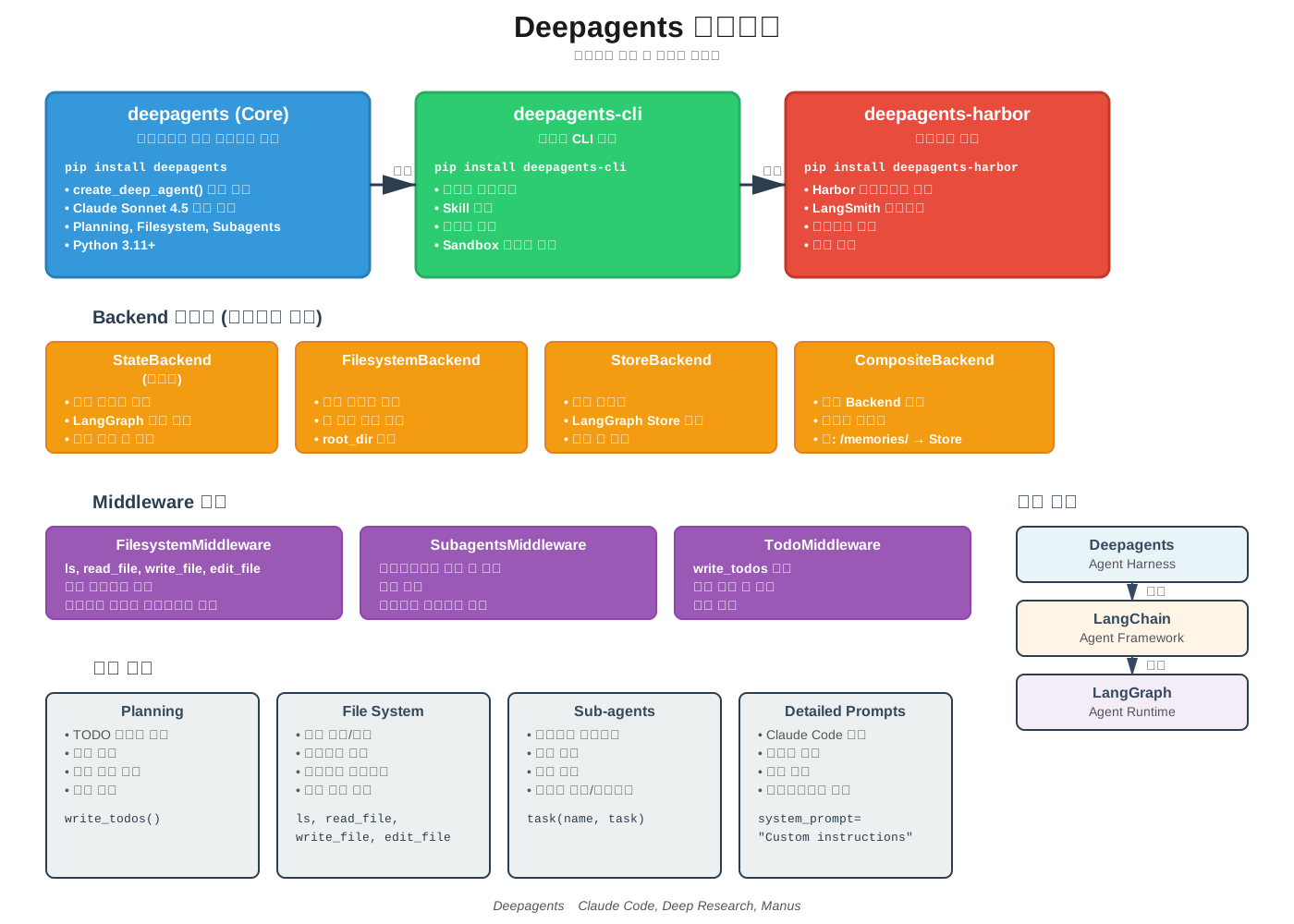
Deepagents는 LangChain과 LangGraph 위에 구축된 오픈소스 에이전트 하네스입니다. Deep Agents는 계획 도구, 파일 시스템 백엔드, 서브에이전트 생성 능력을 갖추고 있어 복잡한 에이전트 작업을 처리하는 데 적합합니다.
GitHub: https://github.com/langchain-ai/deepagents
설치 및 설정
1
2
3
4
5
pip install deepagents

export LANGSMITH_API_KEY=lsv2_pt_...
export LANGSMITH_PROJECT=deepagent-dev
export ANTHROPIC_API_KEY=sk-ant-...
프로젝트 분리 구현
설정 파일:
1
2
3
4
5
6
7
8
9
10
11
12
13
14
15
# deepagent_config.py
import os

# Deepagent 자체는 'agent-dev' 프로젝트에
os.environ["LANGSMITH_PROJECT"] = "agent-dev"

def create_target_app_tracer():
    """대상 앱을 별도 프로젝트로"""
    from langsmith import Client

    client = Client(
        api_key=os.environ["LANGSMITH_API_KEY"],
        project_name="target-app"
    )
    return client
에이전트 코드:
1
2
3
4
5
6
7
8
from deepagent_config import create_target_app_tracer
from langsmith import traceable

target_tracer = create_target_app_tracer()

def my_agent_task():
    # 이 함수는 'target-app' 프로젝트에 기록됨
    pass
Skill 추가
1
mkdir -p ~/.deepagents/skills/langsmith-fetch
1
2
3
4
5
6
7
8
9
10
11
12
13
14
15
16
17
18
19
20
21
22
23
24
25
26
27
28
29
# LangSmith Fetch Skill for Deepagents

## Overview
Automatic trace fetching and analysis during development.

## Usage

### Check recent executions
\`\`\`bash
langsmith-fetch traces ./recent \
  --project-uuid <target-app-uuid> --limit 5
\`\`\`

### Analyze specific failure
\`\`\`bash
langsmith-fetch trace <trace-id> --format pretty
\`\`\`

## Analysis workflow
1. Fetch trace from target-app
2. Identify failure point
3. Examine tool calls and arguments
4. Review LLM prompts/responses
5. Propose fixes

## Integration points
- After code execution
- On error detection
- During iterative improvement
Deepagents 아키텍처 심층 분석
Deepagents는 2025년 8월에 처음 출시된 이후, 10월에 0.2 버전, 12월에 0.3 버전으로 빠르게 발전했습니다. 현재는 세 가지 패키지로 구성된 모노레포 구조를 가지고 있습니다.
세 가지 핵심 패키지
1. deepagents (Core Library) 프로그래밍 방식으로 에이전트를 생성하는 핵심 라이브러리입니다. create_deep_agent() 함수를 통해 에이전트를 구축하며, 기본적으로 Claude Sonnet 4.5 모델(claude-sonnet-4-5-20250929)을 사용합니다.
1
2
3
4
5
6
7
8
from deepagents import create_deep_agent

agent = create_deep_agent(
    model="claude-sonnet-4-5-20250929",  # 기본값
    tools=[custom_tool1, custom_tool2],
    system_prompt="Custom instructions here",
    subagents=[research_subagent]
)
2. deepagents-cli (Command Line Interface) 터미널에서 대화형으로 에이전트와 상호작용할 수 있는 CLI 도구입니다. Skill 관리, 메모리 관리, 샌드박스 제공자(Modal, Daytona, Runloop) 통합을 제공합니다.
1
2
pip install deepagents-cli
deepagent run "Analyze this codebase and suggest improvements"
3. deepagents-harbor (Benchmark Evaluation) Harbor 평가 프레임워크 통합을 제공하여 에이전트를 벤치마크할 수 있습니다. LangSmith 트레이싱과 통합되어 평가 결과를 추적합니다.
Backend 시스템: 유연한 파일시스템 추상화
Deepagents 0.2의 핵심 혁신은 플러깅 가능한 Backend 추상화입니다. 이를 통해 파일이 저장되는 위치와 셸 명령 실행 방식을 제어할 수 있습니다.
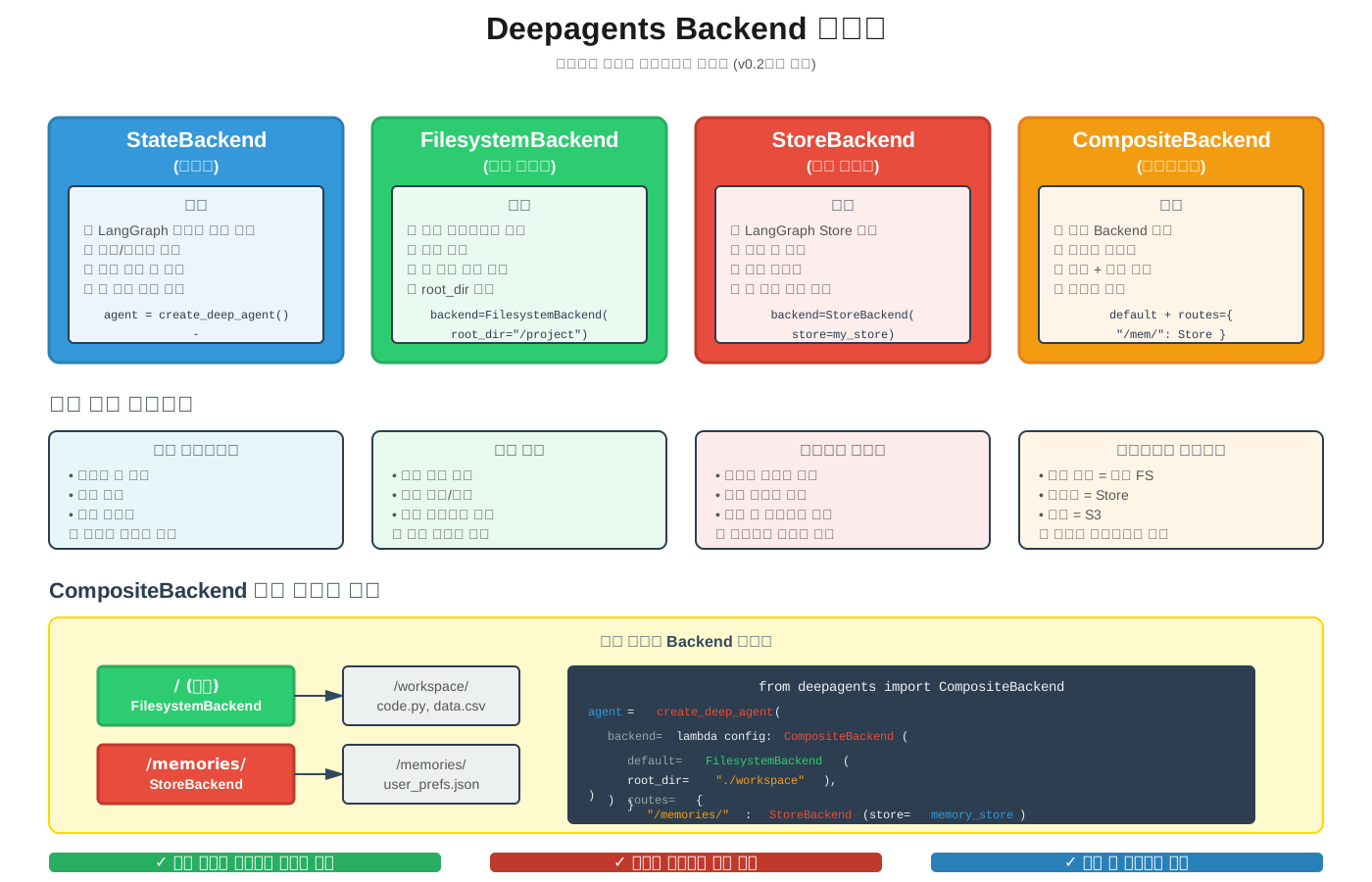
StateBackend (기본값) 임시 상태에 파일을 저장합니다. LangGraph의 대화 상태를 사용하며, 세션이 끝나면 파일이 사라집니다. execute 도구는 오류를 반환합니다.
1
2
3
4
from deepagents import create_deep_agent

# 기본값 - StateBackend 사용
agent = create_deep_agent()  # 파일은 메모리에만 존재
FilesystemBackend 실제 디스크에 파일을 저장하고 셸 명령을 실행할 수 있습니다. 로컬 개발이나 실제 파일 시스템 조작이 필요한 경우에 사용합니다.
1
2
3
4
5
6
7
from deepagents import create_deep_agent, FilesystemBackend

agent = create_deep_agent(
    backend=lambda config: FilesystemBackend(
        root_dir="/path/to/project"
    )
)
StoreBackend LangGraph의 Store를 사용하여 세션 간 파일을 지속합니다. 장기 메모리나 여러 대화에 걸친 파일 보존에 적합합니다.
1
2
3
4
5
6
7
8
9
from deepagents import create_deep_agent, StoreBackend
from langgraph.checkpoint import InMemoryStore

store = InMemoryStore()

agent = create_deep_agent(
    backend=lambda config: StoreBackend(store=store),
    store=store
)
CompositeBackend 여러 Backend를 조합하여 경로별로 다른 저장소를 사용합니다. 예를 들어, 기본 파일은 로컬 파일시스템에 저장하고 /memories/ 디렉토리만 S3 기반 가상 파일시스템을 사용할 수 있습니다.
1
2
3
4
5
6
7
8
9
10
11
from deepagents import create_deep_agent, CompositeBackend
from deepagents import FilesystemBackend, StoreBackend

agent = create_deep_agent(
    backend=lambda config: CompositeBackend(
        default=FilesystemBackend(root_dir="./workspace"),
        routes={
            "/memories/": StoreBackend(store=memory_store)
        }
    )
)
이 패턴을 통해 장기 메모리를 구현할 수 있습니다. 작업 파일은 로컬에 저장하고, 중요한 메모리나 컨텍스트는 영구 저장소에 보관하여 세션 간에도 유지됩니다.
미들웨어 시스템
Deepagents는 미들웨어 기반으로 기능을 확장합니다. 기본 미들웨어 스택은 다음과 같습니다:
- FilesystemMiddleware: 파일 시스템 도구 (ls, read_file, write_file, edit_file) 제공
- SubagentsMiddleware: 서브에이전트 생성 및 관리
- TodoMiddleware: TODO 리스트 계획 도구
커스텀 미들웨어를 추가하여 기능을 확장할 수 있습니다:
1
2
3
4
5
6
7
8
9
from deepagents import create_deep_agent

def custom_middleware(state, config):
    # 커스텀 로직
    return state

agent = create_deep_agent(
    middleware=[custom_middleware]  # 기본 미들웨어 뒤에 추가됨
)
MCP (Model Context Protocol) 통합
Deepagents는 MCP 서버와 통합하여 외부 도구를 쉽게 사용할 수 있습니다.
1
2
3
4
5
6
7
8
9
10
11
12
13
14
15
16
17
18
19
20
21
import asyncio
from langchain_mcp_adapters.client import MultiServerMCPClient
from deepagents import create_deep_agent

async def main():
    # MCP 도구 수집
    mcp_client = MultiServerMCPClient(...)
    mcp_tools = await mcp_client.get_tools()

    # MCP 도구로 에이전트 생성
    agent = create_deep_agent(tools=mcp_tools)

    # 스트리밍 실행
    async for chunk in agent.astream(
        {"messages": [{"role": "user", "content": "What is LangGraph?"}]},
        stream_mode="values"
    ):
        if "messages" in chunk:
            chunk["messages"][-1].pretty_print()

asyncio.run(main())
LangChain vs LangGraph vs Deepagents: 언제 무엇을 사용할까?
이 세 프레임워크는 서로 다른 목적을 가지며, 계층적으로 구축되어 있습니다.
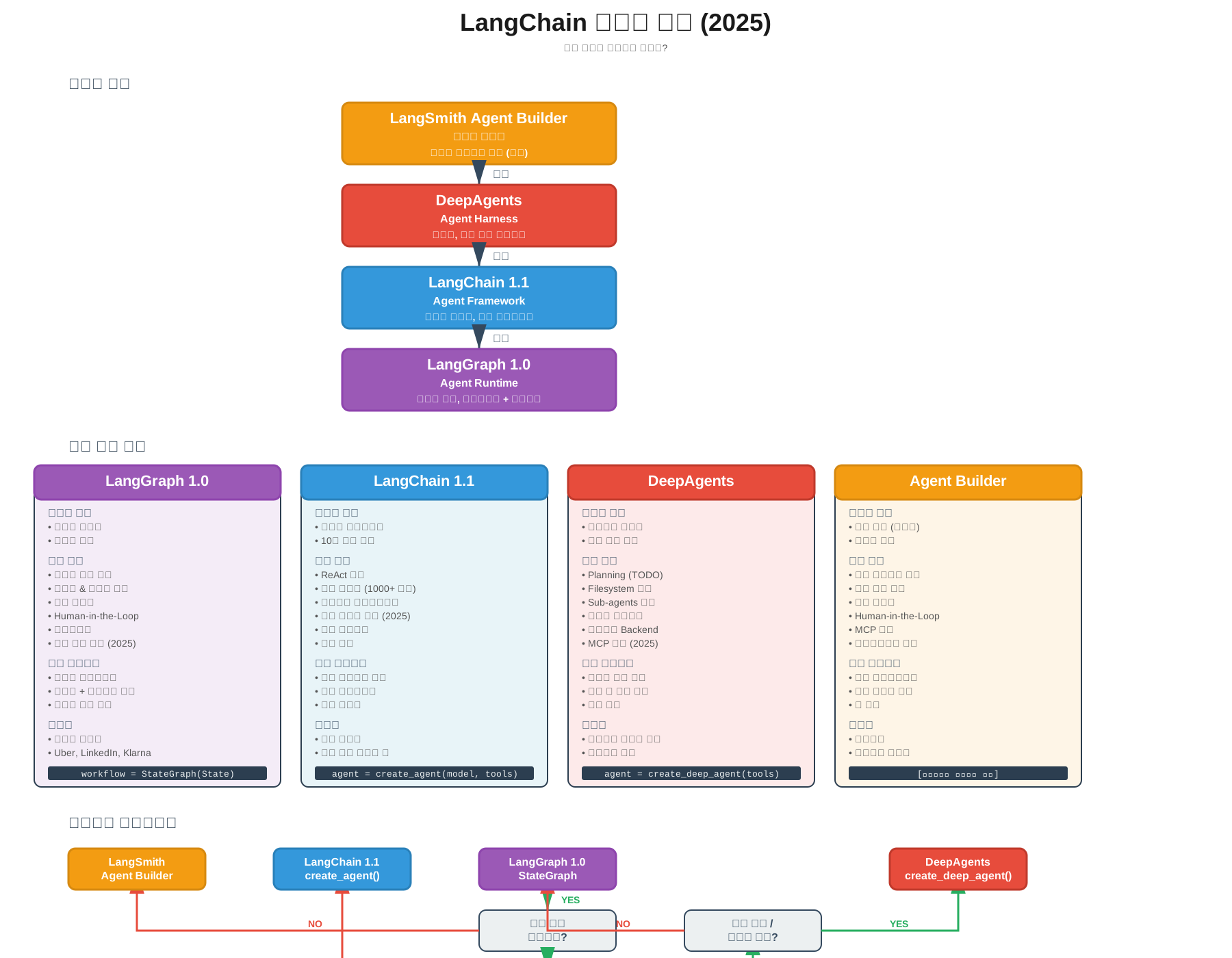
LangGraph: Agent Runtime 저수준 런타임으로, 워크플로우와 에이전트를 조합한 것을 구축할 때 적합합니다. 완전한 제어가 필요하고, 결정론적 워크플로우와 에이전틱 행동을 혼합하려는 경우에 사용합니다.
사용 시나리오:
- 복잡한 상태 머신이 필요한 경우
- Human-in-the-Loop가 중요한 경우
- 내구성 있는 실행과 체크포인팅이 필요한 경우
- 사이클과 조건부 분기가 필요한 경우
1
2
3
4
5
6
7
from langgraph.graph import StateGraph

workflow = StateGraph(MyState)
workflow.add_node("step1", func1)
workflow.add_node("step2", func2)
workflow.add_conditional_edges("step1", router_func)
app = workflow.compile()
LangChain: Agent Framework 고수준 프레임워크로, 핵심 에이전트 루프를 처음부터 구축하고 싶을 때 적합합니다. 모든 프롬프트와 도구를 직접 작성하며, 벤더 종속성 없이 빠르게 프로토타입을 만들 수 있습니다.
사용 시나리오:
- 10줄 이하의 코드로 빠르게 에이전트 시작
- 표준 ReAct 패턴으로 충분한 경우
- 여러 LLM 제공업체를 쉽게 전환하고 싶은 경우
- 미들웨어로 에이전트를 커스터마이징하고 싶은 경우
1
2
3
4
5
6
7
from langchain.agents import create_agent

agent = create_agent(
    model=llm,
    tools=[tool1, tool2],
    state_modifier="You are a helpful assistant"
)
Deepagents: Agent Harness 자율적이고 장기 실행되는 에이전트를 구축할 때 적합합니다. 계획 도구, 파일시스템, 서브에이전트 같은 내장 기능을 활용하려는 경우에 사용합니다.
사용 시나리오:
- 수십 개의 도구 호출이 필요한 복잡한 작업
- 파일시스템 접근이 필요한 경우
- 작업을 하위 작업으로 분해해야 하는 경우
- Claude Code, Deep Research, Manus와 유사한 에이전트 구축
1
2
3
4
5
6
7
from deepagents import create_deep_agent

agent = create_deep_agent(
    tools=[custom_tools],
    system_prompt="Custom instructions",
    subagents=[specialized_agents]
)
계층 구조
1
2
3
4
5
Deepagents (Agent Harness)
    ↓ 기반
LangChain (Agent Framework)
    ↓ 기반
LangGraph (Agent Runtime)
Deepagents는 LangChain의 에이전트 추상화 위에 구축되고, LangChain은 다시 LangGraph의 에이전트 런타임 위에 구축됩니다. 따라서 하나를 선택했다가 나중에 다른 것으로 전환하는 것이 자연스럽고 쉽습니다.
의사결정 플로우차트
1
2
3
4
5
6
복잡한 장기 작업인가?
└─ Yes → Deepagents 사용
└─ No → 표준 에이전트 패턴으로 충분한가?
        └─ Yes → LangChain 사용
        └─ No → 완전한 제어가 필요한가?
                └─ Yes → LangGraph 사용
Deepagents 최신 기능 (2025년 12월 기준)
JavaScript/TypeScript 지원 Deepagents는 이제 Python뿐만 아니라 JavaScript/TypeScript도 지원합니다.
1
npm install deepagents
1
2
3
4
5
6
7
8
9
10
11
12
import { createDeepAgent } from "deepagents";
import { tool } from "langchain";

const agent = createDeepAgent({
    model: "claude-sonnet-4-20250514",
    tools: [customTool],
    interruptOn: {
        sensitive_tool: {
            allowedDecisions: ["approve", "edit", "reject"]
        }
    }
});
Deep Agents UI 커스텀 UI를 제공하여 에이전트의 파일 시스템, 실행 단계, 디버그 모드를 시각화할 수 있습니다. LangGraph Studio와 통합되어 사용할 수 있습니다.
1
2
3
4
5
# GitHub에서 UI 레포지토리 클론
git clone https://github.com/langchain-ai/deep-agents-ui
cd deep-agents-ui
npm install
npm run dev
비용 관리 Deepagents는 컨텍스트 요약과 프롬프트 캐싱을 통해 비용을 관리합니다. 파일시스템을 사용하여 큰 컨텍스트를 메모리로 오프로드하고, 컨텍스트 윈도우 오버플로우를 방지합니다.
8. 실전 구현 가이드
기본 환경 구축
패키지 설치:
1
2
3
4
5
6
7
8
9
10
11
12
# 핵심 프레임워크
pip install langchain==1.2.0
pip install langgraph==0.6.7
pip install langsmith
pip install langsmith-fetch

# LLM 제공업체
pip install langchain-anthropic  # Claude
pip install langchain-openai     # GPT

# 코드 에이전트
pip install deepagents
환경 변수 설정:
1
2
3
4
5
6
7
8
9
10
# .env 파일
LANGSMITH_API_KEY=lsv2_pt_...
LANGSMITH_PROJECT=default-project
LANGSMITH_TRACING_V2=true

ANTHROPIC_API_KEY=sk-ant-...
OPENAI_API_KEY=sk-...

AGENT_DEV_PROJECT=agent-development
TARGET_APP_PROJECT=target-application
프로젝트 구조:
1
2
3
4
5
6
7
8
9
10
11
agent-dev-loop/
├── config/
│   └── langsmith_config.py
├── src/
│   ├── agent.py
│   ├── tools.py
│   └── self_improving_agent.py
├── tests/
│   └── test_agent.py
├── skills/
└── .env
기본 에이전트 구현
설정 파일 (config/langsmith_config.py):
1
2
3
4
5
6
7
8
9
10
11
12
13
14
15
16
17
18
19
20
21
22
23
24
25
26
27
28
29
import os
from langsmith import Client
from typing import Literal

ProjectType = Literal["agent-dev", "target-app"]

class LangSmithConfig:
    def __init__(self):
        self.api_key = os.environ.get("LANGSMITH_API_KEY")
        self.agent_dev_project = os.environ.get(
            "AGENT_DEV_PROJECT", "agent-development"
        )
        self.target_app_project = os.environ.get(
            "TARGET_APP_PROJECT", "target-application"
        )

    def get_client(self, project_type: ProjectType = "agent-dev") -> Client:
        project = (
            self.agent_dev_project
            if project_type == "agent-dev"
            else self.target_app_project
        )

        return Client(
            api_key=self.api_key,
            project_name=project
        )

langsmith_config = LangSmithConfig()
도구 정의 (src/tools.py):
1
2
3
4
5
6
7
8
9
10
11
12
13
14
15
16
17
18
19
20
21
22
23
24
25
26
from langchain_core.tools import tool
from typing import List

def search_documents(query: str) -> List[str]:
    """문서 검색 도구"""
    return [
        f"Document about {query} - Result 1",
        f"Document about {query} - Result 2",
    ]

def calculate(expression: str) -> float:
    """수식 계산 도구"""
    try:
        result = eval(expression)
        return float(result)
    except Exception as e:
        raise ValueError(f"계산 오류: {str(e)}")

def save_to_file(content: str, filename: str) -> str:
    """파일 저장 도구"""
    try:
        with open(filename, 'w') as f:
            f.write(content)
        return f"Successfully saved to {filename}"
    except Exception as e:
        raise IOError(f"파일 저장 오류: {str(e)}")
에이전트 구현 (src/agent.py):
1
2
3
4
5
6
7
8
9
10
11
12
13
14
15
16
17
18
19
20
21
22
23
24
25
26
27
28
29
30
31
32
from langchain_anthropic import ChatAnthropic
from langgraph.prebuilt import create_react_agent
from langsmith import traceable
from config.langsmith_config import langsmith_config
from src.tools import search_documents, calculate, save_to_file

target_client = langsmith_config.get_client("target-app")

def create_research_agent():
    """연구 에이전트 생성"""
    llm = ChatAnthropic(
        model="claude-sonnet-4-20250514",
        temperature=0.1
    )

    tools = [search_documents, calculate, save_to_file]

    agent = create_react_agent(
        llm,
        tools,
        state_modifier="You are a helpful research assistant."
    )

    return agent

def run_agent(query: str):
    """에이전트 실행"""
    agent = create_research_agent()
    result = agent.invoke({
        "messages": [("user", query)]
    })
    return result
자율 개선 루프 구현
src/self_improving_agent.py:
1
2
3
4
5
6
7
8
9
10
11
12
13
14
15
16
17
18
19
20
21
22
23
24
25
26
27
28
29
30
31
32
33
34
35
36
37
38
39
40
41
42
43
44
45
46
47
48
49
50
51
52
53
54
55
56
57
58
59
60
61
62
63
64
65
66
67
68
69
70
71
72
73
74
75
76
77
78
79
80
81
82
83
84
85
86
87
88
89
90
91
92
93
import subprocess
import json
from typing import Dict, Any, List
from langsmith import traceable
from config.langsmith_config import langsmith_config

agent_client = langsmith_config.get_client("agent-dev")

class SelfImprovingAgent:
    def __init__(self):
        self.target_client = langsmith_config.get_client("target-app")
        self.iteration_history: List[Dict[str, Any]] = []

    @traceable(client=agent_client, name="fetch_traces")
    def fetch_recent_traces(self, limit: int = 5) -> List[Dict]:
        """최근 트레이스 가져오기"""
        cmd = [
            "langsmith-fetch",
            "traces",
            "--limit", str(limit),
            "--format", "json"
        ]

        result = subprocess.run(cmd, capture_output=True, text=True)
        if result.returncode == 0:
            return json.loads(result.stdout)
        else:
            raise Exception(f"트레이스 가져오기 실패: {result.stderr}")

    @traceable(client=agent_client, name="analyze_traces")
    def analyze_traces(self, traces: List[Dict]) -> Dict[str, Any]:
        """트레이스 분석"""
        analysis = {
            "total_traces": len(traces),
            "errors": [],
            "performance_issues": [],
            "suggestions": []
        }

        for trace in traces:
            if "error" in trace:
                analysis["errors"].append({
                    "trace_id": trace["id"],
                    "error": trace["error"]
                })

            if trace.get("latency", 0) > 5000:
                analysis["performance_issues"].append({
                    "trace_id": trace["id"],
                    "latency": trace["latency"]
                })

        if analysis["errors"]:
            analysis["suggestions"].append(
                "오류 발견: 도구 인자와 프롬프트 검토 필요"
            )

        if analysis["performance_issues"]:
            analysis["suggestions"].append(
                "성능 문제 감지: 도구 호출 최적화 필요"
            )

        return analysis

    @traceable(client=agent_client, name="apply_improvements")
    def apply_improvements(self, analysis: Dict[str, Any]) -> str:
        """개선 적용"""
        improvements = []

        for error in analysis["errors"]:
            improvement = f"Fixing error in trace {error['trace_id']}"
            improvements.append(improvement)

        for perf in analysis["performance_issues"]:
            improvement = f"Optimizing trace {perf['trace_id']}"
            improvements.append(improvement)

        return "\n".join(improvements) if improvements else "No improvements needed"

    @traceable(client=agent_client, name="improvement_iteration")
    def run_improvement_iteration(self):
        """개선 반복 실행"""
        traces = self.fetch_recent_traces(limit=10)
        analysis = self.analyze_traces(traces)
        improvements = self.apply_improvements(analysis)

        iteration_result = {
            "analysis": analysis,
            "improvements": improvements
        }
        self.iteration_history.append(iteration_result)

        return iteration_result
통합 실행
main.py:
1
2
3
4
5
6
7
8
9
10
11
12
13
14
15
16
17
18
19
20
21
22
23
24
25
26
27
28
29
30
31
32
33
34
35
36
37
38
39
40
41
42
import os
from dotenv import load_dotenv
from src.agent import run_agent
from src.self_improving_agent import SelfImprovingAgent

load_dotenv()

def main():
    print("=== 자율 개발 루프 시작 ===\n")

    # 1. 초기 에이전트 실행
    print("1. 초기 에이전트 실행")
    queries = [
        "Search for LangChain",
        "Calculate 100 * 50 + 25",
        "Search for AI agents and save to agents.txt"
    ]

    for query in queries:
        print(f"\nQuery: {query}")
        result = run_agent(query)
        print(f"Result: {str(result)[:200]}...")

    # 2. 트레이스 분석 및 개선
    print("\n\n2. 트레이스 분석 및 자율 개선")
    improver = SelfImprovingAgent()

    for iteration in range(2):
        print(f"\n--- 개선 반복 {iteration + 1} ---")
        result = improver.run_improvement_iteration()

        print(f"발견된 오류: {len(result['analysis']['errors'])}")
        print(f"성능 문제: {len(result['analysis']['performance_issues'])}")
        print(f"제안사항: {len(result['analysis']['suggestions'])}")

        if result['improvements']:
            print(f"적용된 개선:\n{result['improvements']}")

    print("\n=== 자율 개발 루프 완료 ===")

if __name__ == "__main__":
    main()
9. 고급 활용 패턴
평가 기반 개선
LangSmith의 평가 기능을 활용하여 에이전트를 체계적으로 개선할 수 있습니다.
src/evaluation_loop.py:
1
2
3
4
5
6
7
8
9
10
11
12
13
14
15
16
17
18
19
20
21
22
23
24
25
26
27
28
29
30
31
32
33
34
35
36
37
38
39
40
41
42
43
44
45
46
47
48
49
50
51
52
53
54
55
56
57
58
59
60
61
62
63
64
65
66
67
68
69
70
71
72
73
74
75
76
77
78
79
80
81
82
83
from langsmith import Client, evaluate
from langsmith.schemas import Run, Example
from typing import List, Dict, Any

class EvaluationBasedImprovement:
    def __init__(self, dataset_name: str):
        self.client = Client()
        self.dataset_name = dataset_name

    def create_dataset_from_traces(self, trace_ids: List[str]):
        """트레이스로부터 평가 데이터셋 생성"""
        dataset = self.client.create_dataset(
            dataset_name=self.dataset_name,
            description="Traces for agent evaluation"
        )

        for trace_id in trace_ids:
            trace = self.client.read_run(trace_id)
            self.client.create_example(
                inputs=trace.inputs,
                outputs=trace.outputs,
                dataset_id=dataset.id
            )

    def custom_evaluator(self, run: Run, example: Example) -> Dict[str, Any]:
        """커스텀 평가자"""
        score = 0.0
        feedback = []

        # 응답 시간 평가
        if run.latency_ms < 3000:
            score += 0.3
        else:
            feedback.append("응답 시간 초과")

        # 오류 검사
        if not run.error:
            score += 0.3
        else:
            feedback.append(f"오류: {run.error}")

        # 출력 품질
        output_length = len(str(run.outputs))
        if 100 < output_length < 2000:
            score += 0.4
        else:
            feedback.append("출력 길이 부적절")

        return {
            "score": score,
            "feedback": "; ".join(feedback)
        }

    def run_evaluation(self, agent_function):
        """평가 실행"""
        results = evaluate(
            agent_function,
            data=self.dataset_name,
            evaluators=[self.custom_evaluator],
            experiment_prefix="agent-improvement"
        )
        return results

    def analyze_results(self, results) -> Dict[str, Any]:
        """평가 결과 분석"""
        total_score = sum(r.score for r in results)
        avg_score = total_score / len(results) if results else 0

        low_score_examples = [r for r in results if r.score < 0.5]

        return {
            "average_score": avg_score,
            "total_runs": len(results),
            "low_score_count": len(low_score_examples),
            "improvement_targets": [
                {
                    "example_id": r.example_id,
                    "score": r.score,
                    "feedback": r.feedback
                }
                for r in low_score_examples
            ]
        }
멀티턴 대화 평가
복잡한 대화형 에이전트 평가 패턴:
src/multi_turn_evaluation.py:
1
2
3
4
5
6
7
8
9
10
11
12
13
14
15
16
17
18
19
20
21
22
23
24
25
26
27
28
29
30
31
32
33
34
35
36
37
38
39
40
41
42
43
44
45
46
47
48
49
50
51
52
53
54
55
56
57
58
59
60
61
62
63
64
65
66
67
68
69
70
71
72
73
74
75
76
77
from langsmith import Client
from typing import List, Dict
import subprocess
import json

class MultiTurnEvaluator:
    def __init__(self, thread_id: str):
        self.client = Client()
        self.thread_id = thread_id

    def fetch_thread(self) -> List[Dict]:
        """스레드(대화) 가져오기"""
        cmd = [
            "langsmith-fetch",
            "thread",
            self.thread_id,
            "--format", "json"
        ]

        result = subprocess.run(cmd, capture_output=True, text=True)
        return json.loads(result.stdout)

    def evaluate_conversation_quality(self, thread: List[Dict]) -> Dict:
        """대화 품질 평가"""
        metrics = {
            "total_turns": len(thread),
            "user_turns": sum(1 for t in thread if t.get("role") == "user"),
            "agent_turns": sum(1 for t in thread if t.get("role") == "assistant"),
            "tool_uses": sum(len(t.get("tool_calls", [])) for t in thread),
            "errors": sum(1 for t in thread if t.get("error")),
            "avg_response_time": sum(t.get("latency_ms", 0) for t in thread) / len(thread)
        }

        # 품질 점수 계산
        quality_score = 0.0

        if 3 <= metrics["total_turns"] <= 15:
            quality_score += 0.2

        if metrics["errors"] == 0:
            quality_score += 0.3

        if 1 <= metrics["tool_uses"] <= 10:
            quality_score += 0.2

        if metrics["avg_response_time"] < 3000:
            quality_score += 0.3

        metrics["quality_score"] = quality_score

        return metrics

    def identify_improvement_points(self, metrics: Dict) -> List[str]:
        """개선 포인트 식별"""
        improvements = []

        if metrics["errors"] > 0:
            improvements.append(
                f"{metrics['errors']}개 오류 발생. 도구 인자 검증 필요"
            )

        if metrics["avg_response_time"] > 5000:
            improvements.append(
                "평균 응답 시간 과다. 도구 호출 최적화 필요"
            )

        if metrics["tool_uses"] == 0:
            improvements.append(
                "도구 미사용. 프롬프트에 도구 사용 장려 필요"
            )

        if metrics["total_turns"] > 20:
            improvements.append(
                "대화 과다. 효율성 개선 필요"
            )

        return improvements
Human-in-the-Loop 통합
프로덕션 환경에서 중요한 결정에 사람의 검토를 포함하는 패턴:
src/hitl_agent.py:
1
2
3
4
5
6
7
8
9
10
11
12
13
14
15
16
17
18
19
20
21
22
23
24
25
26
27
28
29
30
31
32
33
34
35
36
37
38
39
40
41
42
43
44
45
46
47
48
49
50
51
52
53
54
55
56
57
58
59
60
61
62
63
64
65
66
67
68
69
70
71
72
73
74
75
76
77
78
79
80
81
82
83
84
85
86
87
88
89
90
91
92
93
94
95
96
97
98
99
from langgraph.graph import StateGraph, END
from langgraph.checkpoint.memory import MemorySaver
from typing import TypedDict, Literal
from langsmith import traceable

class HITLState(TypedDict):
    messages: list
    pending_action: dict | None
    human_approved: bool
    feedback: str | None

def create_hitl_agent():
    """Human-in-the-Loop 에이전트"""

    def agent_action(state: HITLState):
        """에이전트 액션"""
        action = {
            "type": "database_update",
            "details": "Will update 1000 records"
        }

        return {
            "pending_action": action,
            "human_approved": False
        }

    def wait_for_approval(state: HITLState) -> Literal["approved", "rejected"]:
        """승인 대기"""
        return "approved" if state.get("human_approved") else "rejected"

    def execute_action(state: HITLState):
        """승인된 액션 실행"""
        action = state["pending_action"]
        return {
            "messages": state["messages"] + [
                f"Executed: {action['type']}"
            ],
            "pending_action": None
        }

    def handle_rejection(state: HITLState):
        """거부된 액션 처리"""
        feedback = state.get("feedback", "No feedback")
        return {
            "messages": state["messages"] + [
                f"Rejected. Feedback: {feedback}"
            ],
            "pending_action": None
        }

    # 그래프 구축
    workflow = StateGraph(HITLState)

    workflow.add_node("agent", agent_action)
    workflow.add_node("execute", execute_action)
    workflow.add_node("reject", handle_rejection)

    workflow.set_entry_point("agent")

    workflow.add_conditional_edges(
        "agent",
        wait_for_approval,
        {
            "approved": "execute",
            "rejected": "reject"
        }
    )

    workflow.add_edge("execute", END)
    workflow.add_edge("reject", END)

    memory = MemorySaver()
    app = workflow.compile(
        checkpointer=memory,
        interrupt_before=["execute"]
    )

    return app

def use_hitl_agent():
    """사용 예제"""
    agent = create_hitl_agent()

    config = {"configurable": {"thread_id": "hitl-001"}}

    # 초기 실행
    result = agent.invoke({
        "messages": ["Start critical operation"],
        "human_approved": False
    }, config)

    print(f"Pending: {result['pending_action']}")

    # 승인 후 재개
    result = agent.invoke({
        "human_approved": True
    }, config)

    print(f"Final: {result}")
프롬프트 버전 관리와 A/B 테스트
src/prompt_management.py:
1
2
3
4
5
6
7
8
9
10
11
12
13
14
15
16
17
18
19
20
21
22
23
24
25
26
27
28
29
30
31
32
33
34
35
36
37
38
39
40
41
42
43
44
45
46
47
48
49
50
51
52
53
54
55
56
57
58
59
60
61
62
63
64
65
66
67
68
69
70
71
72
73
74
75
76
77
78
79
80
81
82
83
84
85
86
87
88
89
90
91
92
93
94
95
from langsmith import Client
from typing import Dict, List

class PromptManager:
    def __init__(self):
        self.client = Client()

    def create_prompt_version(
        self,
        prompt_name: str,
        template: str,
        version_tag: str,
        metadata: Dict = None
    ):
        """프롬프트 버전 생성"""
        prompt = self.client.create_prompt(
            prompt_name,
            template=template,
            metadata=metadata or {}
        )

        self.client.update_prompt(
            prompt.id,
            tags=[version_tag]
        )

        return prompt

    def ab_test_prompts(
        self,
        prompt_a_name: str,
        prompt_b_name: str,
        test_inputs: List[Dict],
        agent_function
    ) -> Dict:
        """두 프롬프트 A/B 테스트"""
        results = {
            "prompt_a": [],
            "prompt_b": []
        }

        for input_data in test_inputs:
            result_a = agent_function(
                input_data,
                prompt_name=prompt_a_name
            )
            results["prompt_a"].append(result_a)

            result_b = agent_function(
                input_data,
                prompt_name=prompt_b_name
            )
            results["prompt_b"].append(result_b)

        comparison = self.compare_results(
            results["prompt_a"],
            results["prompt_b"]
        )

        return {
            "results": results,
            "comparison": comparison
        }

    def compare_results(
        self,
        results_a: List,
        results_b: List
    ) -> Dict:
        """결과 비교"""
        avg_latency_a = sum(
            r.get("latency_ms", 0) for r in results_a
        ) / len(results_a)

        avg_latency_b = sum(
            r.get("latency_ms", 0) for r in results_b
        ) / len(results_b)

        errors_a = sum(1 for r in results_a if r.get("error"))
        errors_b = sum(1 for r in results_b if r.get("error"))

        winner = "A" if (avg_latency_a < avg_latency_b and
                        errors_a <= errors_b) else "B"

        return {
            "prompt_a": {
                "avg_latency": avg_latency_a,
                "error_count": errors_a
            },
            "prompt_b": {
                "avg_latency": avg_latency_b,
                "error_count": errors_b
            },
            "winner": winner
        }
10. 프로덕션 고려사항
확장성
트레이스 샘플링:
1
2
3
4
5
6
7
8
9
import random
from langsmith import traceable

def should_trace() -> bool:
    """10% 샘플링"""
    return random.random() < 0.1

def my_function():
    pass
비동기 처리:
1
2
3
4
5
6
7
8
9
10
11
12
13
14
import asyncio
from concurrent.futures import ThreadPoolExecutor

class AsyncImprovementLoop:
    def __init__(self):
        self.executor = ThreadPoolExecutor(max_workers=4)

    async def analyze_traces_async(self):
        loop = asyncio.get_event_loop()
        result = await loop.run_in_executor(
            self.executor,
            self.fetch_and_analyze_traces
        )
        return result
배치 처리:
1
2
3
4
5
6
7
8
9
10
11
12
13
14
from datetime import datetime, timedelta

class BatchAnalyzer:
    def __init__(self, batch_window_hours: int = 1):
        self.batch_window = timedelta(hours=batch_window_hours)
        self.last_analysis = datetime.now()

    def should_run_analysis(self) -> bool:
        return datetime.now() - self.last_analysis > self.batch_window

    def run_batch_analysis(self):
        if self.should_run_analysis():
            self.analyze_recent_batch()
            self.last_analysis = datetime.now()
보안과 컴플라이언스
민감한 데이터 필터링:
1
2
3
4
5
6
7
8
9
10
11
12
13
14
15
16
17
18
19
20
21
22
23
24
25
26
27
28
29
30
31
32
33
34
35
import re

class SensitiveDataFilter:
    @staticmethod
    def filter_pii(text: str) -> str:
        """개인 식별 정보 제거"""
        # 이메일
        text = re.sub(
            r'\b[A-Za-z0-9._%+-]+@[A-Za-z0-9.-]+\.[A-Z|a-z]{2,}\b',
            '[EMAIL]',
            text
        )

        # 전화번호
        text = re.sub(
            r'\b\d{3}[-.]?\d{3,4}[-.]?\d{4}\b',
            '[PHONE]',
            text
        )

        # 신용카드
        text = re.sub(
            r'\b\d{4}[-\s]?\d{4}[-\s]?\d{4}[-\s]?\d{4}\b',
            '[CARD]',
            text
        )

        return text

from langsmith import traceable

    process_inputs=lambda x: SensitiveDataFilter.filter_pii(str(x))
)
def handle_user_data(data):
    pass
감사 로그:
1
2
3
4
5
6
7
8
9
10
11
12
13
14
15
16
17
18
19
20
21
22
23
24
25
26
27
28
29
30
31
import logging
from datetime import datetime

class AuditLogger:
    def __init__(self):
        self.logger = logging.getLogger("audit")
        handler = logging.FileHandler("audit.log")
        handler.setFormatter(
            logging.Formatter(
                '%(asctime)s - %(name)s - %(levelname)s - %(message)s'
            )
        )
        self.logger.addHandler(handler)
        self.logger.setLevel(logging.INFO)

    def log_improvement(
        self,
        improvement_type: str,
        details: dict,
        approver: str = None
    ):
        """개선 작업 로깅"""
        self.logger.info(
            f"Improvement: {improvement_type}",
            extra={
                "timestamp": datetime.now().isoformat(),
                "type": improvement_type,
                "details": details,
                "approver": approver
            }
        )
접근 제어:
1
2
3
4
5
6
7
8
9
10
11
12
13
14
15
16
17
18
19
20
21
22
23
24
from enum import Enum

class PermissionLevel(Enum):
    READ_ONLY = "read_only"
    SUGGEST = "suggest"
    AUTO_FIX_MINOR = "auto_fix_minor"
    AUTO_FIX_MAJOR = "auto_fix_major"

class PermissionController:
    def __init__(self, level: PermissionLevel):
        self.level = level

    def can_auto_fix(self, fix_severity: str) -> bool:
        """자동 수정 권한 확인"""
        if self.level == PermissionLevel.READ_ONLY:
            return False

        if self.level == PermissionLevel.SUGGEST:
            return False

        if self.level == PermissionLevel.AUTO_FIX_MINOR:
            return fix_severity == "minor"

        return True  # AUTO_FIX_MAJOR
모니터링과 알림
1
2
3
4
5
6
7
8
9
10
11
12
13
14
15
16
17
18
19
20
21
22
23
24
25
26
27
28
29
30
31
32
33
34
35
36
37
38
39
40
from langsmith import Client

class LoopMonitor:
    def __init__(self):
        self.client = Client()
        self.metrics = {
            "iterations": 0,
            "improvements_applied": 0,
            "failures": 0
        }

    def monitor_iteration(self, iteration_result: dict):
        """반복 모니터링"""
        self.metrics["iterations"] += 1

        if iteration_result.get("success"):
            self.metrics["improvements_applied"] += len(
                iteration_result.get("improvements", [])
            )
        else:
            self.metrics["failures"] += 1
            self.alert_failure(iteration_result)

    def alert_failure(self, result: dict):
        """실패 알림"""
        print(f"ALERT: Iteration failed: {result.get('error')}")

    def get_health_status(self) -> dict:
        """시스템 건강 상태"""
        failure_rate = (
            self.metrics["failures"] / self.metrics["iterations"]
            if self.metrics["iterations"] > 0
            else 0
        )

        return {
            "status": "healthy" if failure_rate < 0.1 else "degraded",
            "metrics": self.metrics,
            "failure_rate": failure_rate
        }
비용 최적화
트레이스 보존 정책:
1
2
3
4
5
6
7
8
9
10
11
12
13
14
15
16
17
18
19
20
21
22
23
from datetime import datetime, timedelta

class TraceRetentionPolicy:
    def __init__(self):
        self.client = Client()

    def archive_old_traces(self, days_to_keep: int = 30):
        """오래된 트레이스 아카이브"""
        cutoff_date = datetime.now() - timedelta(days=days_to_keep)

        old_traces = self.client.list_runs(
            project_name=os.environ["LANGSMITH_PROJECT"],
            filter=f"end_time < {cutoff_date.isoformat()}"
        )

        for trace in old_traces:
            if not self.is_important(trace):
                self.client.delete_run(trace.id)

    def is_important(self, trace) -> bool:
        """중요한 트레이스 판단"""
        return (trace.error is not None or
                trace.feedback_stats.get("bookmark", 0) > 0)
효율적인 모델 선택:
1
2
3
4
5
6
7
8
9
10
11
12
13
14
15
16
class ModelSelector:
    MODEL_COSTS = {
        "claude-sonnet-4": 0.003,
        "claude-haiku-4.5": 0.0008,
        "gpt-4": 0.03,
        "gpt-3.5-turbo": 0.002
    }

    def select_model(self, task_complexity: str):
        """작업 복잡도에 따른 모델 선택"""
        if task_complexity == "simple":
            return "claude-haiku-4.5"
        elif task_complexity == "medium":
            return "claude-sonnet-4"
        else:
            return "gpt-4"
장애 복구
1
2
3
4
5
6
7
8
9
10
11
12
13
14
15
16
17
18
19
20
21
22
23
24
25
26
from langgraph.checkpoint.memory import MemorySaver

class ResilientAgent:
    def __init__(self):
        self.checkpointer = MemorySaver()

    def create_resumable_agent(self):
        """재개 가능한 에이전트"""
        workflow = StateGraph(AgentState)
        # 노드 추가...

        app = workflow.compile(checkpointer=self.checkpointer)
        return app

    def resume_from_checkpoint(self, thread_id: str):
        """체크포인트에서 재개"""
        app = self.create_resumable_agent()
        config = {"configurable": {"thread_id": thread_id}}

        state = app.get_state(config)

        if state.next:
            result = app.invoke(None, config)
            return result
        else:
            return state.values
성능 모니터링
1
2
3
4
5
6
7
8
9
10
11
12
13
14
15
16
17
18
19
20
21
22
23
24
25
26
27
28
29
30
31
32
33
34
import time
from contextlib import contextmanager

class PerformanceMonitor:
    def __init__(self):
        self.metrics = []

    @contextmanager
    def measure(self, operation_name: str):
        """작업 시간 측정"""
        start = time.time()
        try:
            yield
        finally:
            duration = time.time() - start
            self.metrics.append({
                "operation": operation_name,
                "duration_ms": duration * 1000,
                "timestamp": datetime.now().isoformat()
            })

    def get_statistics(self):
        """통계 조회"""
        if not self.metrics:
            return {}

        durations = [m["duration_ms"] for m in self.metrics]

        return {
            "total_operations": len(self.metrics),
            "avg_duration_ms": sum(durations) / len(durations),
            "max_duration_ms": max(durations),
            "min_duration_ms": min(durations)
        }
결론
핵심 요약
이 가이드에서는 LangSmith와 코드 에이전트를 활용한 자율 개발 루프의 전체 생태계를 살펴보았습니다.
주요 내용:
- LangChain 1.0과 LangGraph 1.0: 프로덕션급 AI 에이전트 개발의 안정적 기반
- LangSmith: 완전한 관찰성, 평가, 배포를 제공하는 통합 플랫폼
- langsmith-fetch: 에이전트가 자신의 실행 기록에 접근하는 핵심 브리지
- Claude Code & Deepagents: Skill 시스템을 통한 자율 개선 구현
- 자율 개발 루프: 에이전트가 스스로 분석하고 개선하는 패러다임 변화
자율 개발 루프의 가치
자율 개발 루프는 AI 에이전트 개발 패러다임의 근본적인 변화를 나타냅니다. 에이전트가 스스로 실행 결과를 분석하고, 문제점을 파악하며, 개선안을 도출하고, 코드를 수정합니다. 개발자는 높은 수준의 의사결정에 집중할 수 있으며, 반복적인 디버깅 작업에서 해방됩니다.
구현 시 주의사항
- 점진적으로 시작: 수동 분석 → 패턴 이해 → 자동화 도입
- 가드레일 설정: 자동 수정 범위 제한, Human-in-the-Loop
- 프로젝트 분리: 메타 에이전트 vs 대상 앱 트레이스 분리
- 보안 우선: 민감 데이터 필터링, 감사 로그
- 비용 모니터링: 샘플링, 보존 정책, 모델 선택 최적화
미래 전망
- 더 정교한 자기 개선 알고리즘
- 멀티 에이전트 협업
- 강력한 평가 메트릭과 벤치마크
- IDE와의 깊은 통합
시작하기
- LangSmith 계정 생성 (smith.langchain.com)
- 패키지 설치
- 간단한 에이전트 구축
- 트레이스 확인
- langsmith-fetch 실습
- 자율 개선 루프 구현
- 커뮤니티 참여
추가 리소스
공식 문서:
- https://docs.langchain.com
- https://docs.langchain.com/langgraph
- https://docs.langchain.com/langsmith
GitHub 저장소:
- https://github.com/langchain-ai/langchain
- https://github.com/langchain-ai/langgraph
- https://github.com/langchain-ai/langsmith-fetch
- https://github.com/langchain-ai/deepagents
- https://github.com/langchain-ai/deepagentsjs (JavaScript 버전)
- https://github.com/langchain-ai/deep-agents-ui (커스텀 UI)
커뮤니티:
- LangChain Blog: https://blog.langchain.com
- LangChain & LangGraph 1.0 출시 (2025-10-22): https://blog.langchain.com/langchain-langgraph-1dot0/
- Deep Agents 소개 (2025-08-04): https://blog.langchain.com/deep-agents/
- Deepagents 0.2 출시 (2025-10-28): https://blog.langchain.com/doubling-down-on-deepagents/
- LangSmith Fetch 소개 (2025-12-10): https://blog.langchain.com/introducing-langsmith-fetch/
- Discord: https://discord.gg/langchain
- LangChain Cookbook
부록: 빠른 참조
환경 변수 체크리스트
1
2
3
4
5
6
7
8
9
10
11
12
# 필수
export LANGSMITH_API_KEY=lsv2_pt_...
export LANGSMITH_PROJECT=your-project
export LANGSMITH_TRACING_V2=true

# LLM (사용하는 것만)
export ANTHROPIC_API_KEY=sk-ant-...
export OPENAI_API_KEY=sk-...

# 프로젝트 분리
export AGENT_DEV_PROJECT=agent-dev
export TARGET_APP_PROJECT=target-app
주요 명령어
1
2
3
4
5
6
7
8
9
10
11
# 설치
pip install langchain langgraph langsmith langsmith-fetch

# 트레이스 조회
langsmith-fetch trace <id>
langsmith-fetch traces --limit 10
langsmith-fetch threads ./my-threads --limit 5

# 설정
langsmith-fetch config set project-uuid <uuid>
langsmith-fetch config show
핵심 API 패턴
1
2
3
4
5
6
7
8
9
10
11
12
13
14
15
16
17
18
19
20
21
22
23
# 에이전트 생성
from langchain_anthropic import ChatAnthropic
from langgraph.prebuilt import create_react_agent

llm = ChatAnthropic(model="claude-sonnet-4-20250514")
agent = create_react_agent(llm, tools=[...])

# 트레이싱
from langsmith import traceable

def my_function():
    pass

# 프로젝트 분리
from langsmith import Client

client = Client(
    api_key=os.environ["LANGSMITH_API_KEY"],
    project_name="specific-project"
)

def my_traced_function():
    pass
문제 해결
Q: 트레이스가 나타나지 않음 A: LANGSMITH_TRACING_V2=true 확인, API 키 확인
Q: langsmith-fetch “project not found” A: LANGSMITH_PROJECT 환경 변수 확인, 프로젝트 존재 확인
Q: 비용 과다 A: 샘플링 활성화, 저렴한 모델 사용, 보존 정책 설정
Q: 잘못된 자동 개선 A: Human-in-the-Loop 구현, 권한 수준 낮춤, 엄격한 검증
버전 호환성
이 가이드 기준 버전:
- LangChain: 1.2.0
- LangGraph: 0.6.7
- LangSmith SDK: 0.2.x
- langsmith-fetch: 최신 (2025년 12월 10일 출시)
- Deepagents: 0.3.0 (2025년 12월 8일 출시)
- Python: 3.10+ (Deepagents는 3.11+ 요구)
- Node.js: 18+ (JavaScript/TypeScript 버전)
라이선스
LangChain, LangGraph, LangSmith는 MIT 라이선스 오픈소스입니다. GitHub에서 이슈 제출 및 기여를 환영합니다.
문서 작성일: 2025-12-18
이 가이드는 LangSmith와 코드 에이전트를 활용한 자율 개발 루프 구축의 완벽한 가이드입니다. 프로토타입부터 프로덕션까지, 에이전트가 스스로 학습하고 개선하는 미래의 소프트웨어 개발 방식을 경험하세요.